The Hardware Behind My Homelab
April 3, 2026
#homelab #kubernetes #k3s #hardware
Part 1 of a short homelab series. This post covers the hardware shape, then Part 2 looks at the Kubernetes and GitOps layer, and Part 3 covers the platform apps that make it usable day to day.
I did not build this homelab to imitate a small datacenter. I built it to run the workloads I actually care about on one box I can understand, patch, and recover without turning the whole thing into a hobby project.
Why This Setup Exists
I wanted one machine at home that could run a useful mix of services without creating a second job.
Game servers were the workload that forced honest hardware decisions. They punish weak CPU choices quickly, especially when single-thread performance is poor, so they were a better sizing input than generic homelab ambition.
That pushed me toward a compact machine with strong CPU headroom instead of a pile of cheaper nodes. I was not chasing HA theater at home. I wanted a small, reliable platform that could handle real workloads and still give me room to run K3s for the rest of the stack.
The Hardware Shape
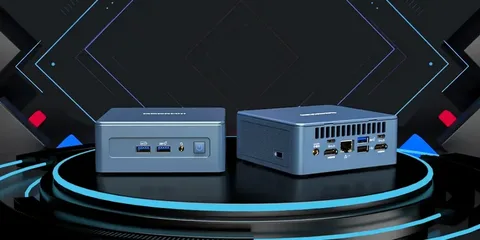
The GEEKOM mini PC is the compact compute node behind this homelab.
The setup is intentionally small:
- one GEEKOM IT13 mini PC
- Intel i7-1280P
- 32 GB RAM
- 1 TB SSD
- Ubuntu as the base OS
- two Synology NAS boxes used for persistent storage and PVC-backed data
Compute is a single-node K3s cluster on the mini PC. Persistent data lives on the Synology boxes.
I like this shape because it stays easy to reason about. There is one compute node to size, monitor, patch, and rebuild. Storage is separate, so I am not tying every stateful workload to the internal disk layout of that one machine.
The mini PC form factor also matters. It is quiet, compact, efficient enough to leave on, and fast enough that I do not feel like I designed the whole platform around a permanent bottleneck.
Why CPU Choice Mattered More Than More Nodes
If I had optimized for homelab aesthetics, I probably would have bought more machines and weaker CPUs. I chose the opposite on purpose.
The Intel i7-1280P made sense because it gives me strong single-thread performance in a very small box. For game servers and other bursty workloads, that matters more than being able to say the cluster spans several nodes.
More low-power nodes would have given me nicer diagrams and better failure-domain separation. They would not have solved the main problem. I needed one box that could handle latency-sensitive work cleanly, with enough headroom left over for the rest of the platform.
So the single-node design is not an unfinished HA plan. It is the plan. I am trading node-level redundancy for better compute density, lower power draw, less noise, and less operational overhead.
What The NAS Layer Changes
The two Synology NAS boxes change the setup more than the mini PC itself.
Once persistent data lives outside the compute node, the single-node tradeoff gets much easier to accept. I can rebuild or replace the K3s host without treating its local disk as the center of gravity for every stateful service.
That does not make the platform highly available. If the compute node is down, workloads are still down. But it does improve recoverability, and it keeps the mini PC from becoming both the control plane and the long-term storage box for everything.
That is the kind of tradeoff I care about in a homelab: practical separation of concerns, not fake resilience.
The Tradeoffs Of Keeping It Small
Keeping the setup this small means accepting obvious limits.
There is no node-level redundancy. Capacity is finite. If I need materially more headroom, I cannot hide behind clever scheduling. I need a bigger box or a different workload mix.
I accept that because the system stays honest. I know where the bottlenecks are, I know why the hardware looks the way it does, and I am not maintaining extra machines just to preserve the image of running a tiny on-prem platform.
For me, that is the useful version of a homelab. It runs real workloads, gives me a practical K3s environment, and keeps persistent storage where it belongs. The design follows the workload, not the photo.
flowchart LR
    mini["GEEKOM mini PC"] --> k3s["K3s"]
    k3s --> workloads["Workloads"]
    workloads -->|persistent storage| nas["Synology NAS"]